
The ToolShell Crisis: Why Your SharePoint Server Is a Ticking Time Bomb
The ToolShell Crisis: Why Your SharePoint Server Is a Ticking Time Bomb
Executive Summary: The Australian Cyber Security Centre has issued urgent warnings about actively exploited vulnerabilities in Microsoft SharePoint Server (CVE-2025-53770) that enable unauthenticated remote code execution. With state-aligned actors and ransomware groups already compromising Australian organisations, this threat represents an immediate and severe risk to business-critical data and infrastructure.

What Is the ToolShell Vulnerability?
The cybersecurity community is confronting one of the most severe Microsoft SharePoint vulnerabilities in recent memory. Tracked as CVE-2025-53770 and colloquially known as “ToolShell”, this critical flaw enables unauthenticated attackers to execute arbitrary code on vulnerable on-premises SharePoint servers, with a CVSS severity score of 9.8.
The vulnerability stems from insecure deserialisation of untrusted data within SharePoint’s authentication mechanisms. When an attacker sends a specially crafted request to the /_layouts/15/ToolPane.aspx endpoint, the server processes malicious serialised objects, effectively bypassing authentication controls and executing commands with system-level privileges.
Key Technical Characteristics
- Attack Vector: Network-based, requires no user interaction
- Authentication: None required (unauthenticated exploitation)
- Impact: Complete system compromise and data breach
- Affected Versions: SharePoint Server 2016, 2019, and Subscription Edition
- Not Affected: SharePoint Online (Microsoft 365 cloud version)
Microsoft confirmed active exploitation in July 2025, and the ACSC immediately issued an “act now” alert to Australian organisations. The vulnerability is part of a broader attack chain that includes multiple SharePoint flaws, collectively creating an exploitation pathway that can even bypass partially applied patches.
Why Australian Organisations Are at High Risk
Australian businesses face disproportionate exposure to this threat due to several local factors that amplify both the likelihood of attack and the potential consequences of compromise.
Widespread On-Premises Deployment
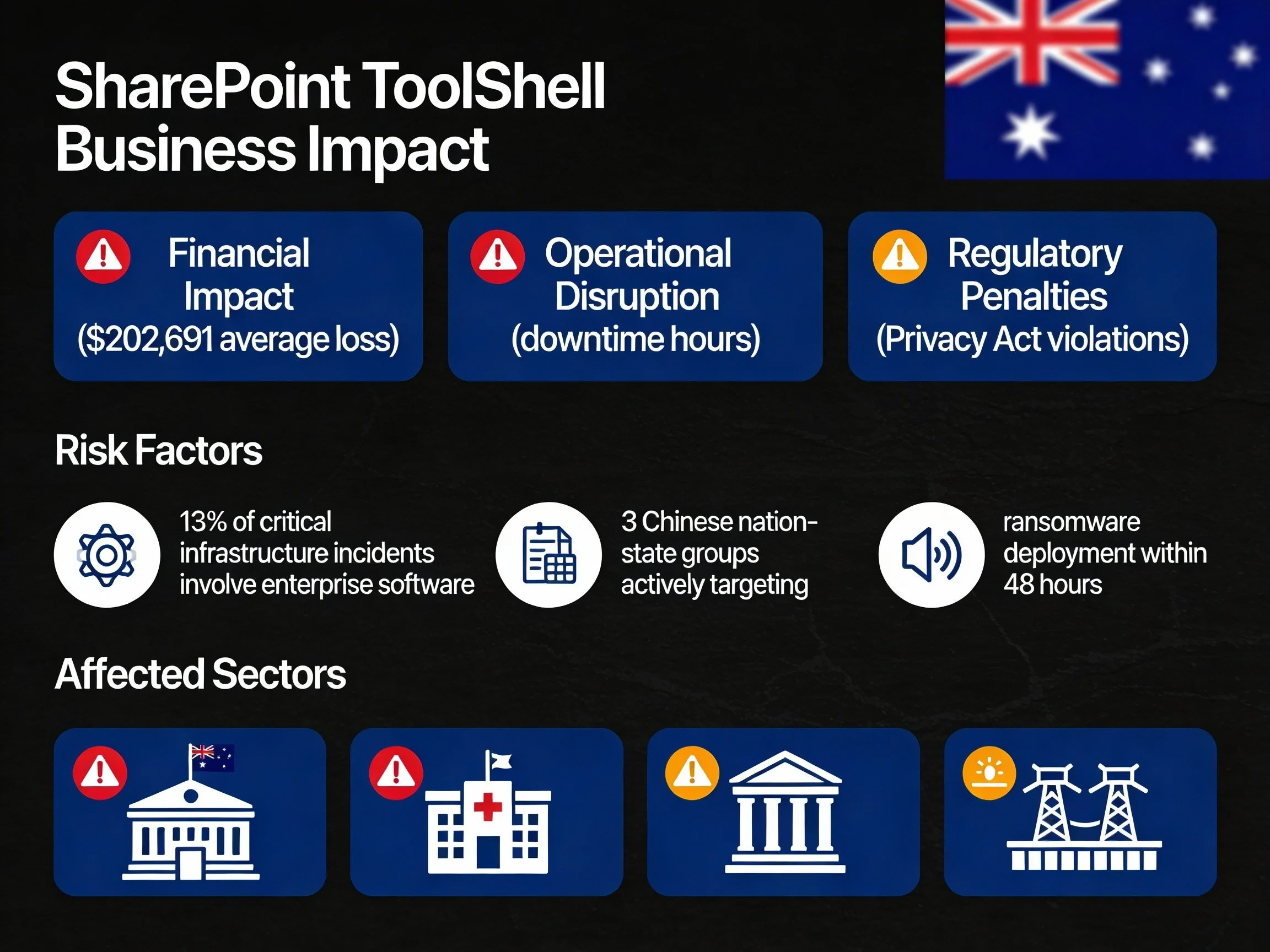
Many Australian enterprises, particularly in government, healthcare, finance, and critical infrastructure, maintain on-premises SharePoint installations for compliance, data sovereignty, or legacy integration reasons. The ACSC has identified these sectors as primary targets, with a significant proportion of critical incidents now involving enterprise collaboration platforms.
Active Targeting by Sophisticated Actors
Exploitation has been linked to multiple nation-state groups alongside criminal ransomware operations. These actors are using ToolShell to gain initial footholds before deploying ransomware and conducting long-term espionage. The same techniques observed against overseas governments and Fortune 500 entities are now being applied to Australian organisations.
Regulatory and Compliance Pressure
With strengthened Privacy Act reforms and higher penalty regimes in force, organisations now face enhanced regulatory scrutiny and potential civil action for serious data breaches. A successful SharePoint compromise exposing customer or employee data can trigger:
- Regulatory investigations under privacy and sector-specific regimes
- Class actions and civil litigation for privacy harms
- Reputational damage impacting customer and investor confidence
The Business Impact of SharePoint Compromise
The consequences extend far beyond the initial server breach. SharePoint’s deep integration with the Microsoft ecosystem turns compromise into an enterprise-wide crisis.
Data Exfiltration and Intellectual Property Theft
Attackers gain immediate access to:
- Confidential business documents and strategic plans
- Financial records, contracts, and payroll data
- Customer databases and personally identifiable information
- Intellectual property and proprietary research
Lateral Movement and Network Propagation
Once inside, threat actors use SharePoint as a beachhead to:
- Harvest credentials and tokens from memory and configuration stores
- Move laterally to domain controllers and line-of-business applications
- Deploy ransomware across file servers and endpoints
- Establish persistent backdoors for long-term access
Operational Disruption and Financial Loss
SharePoint underpins internal collaboration and document workflows. Its compromise can disrupt:
- Day-to-day operations and project delivery
- Customer and supplier communications
- Regulatory reporting and board reporting cycles
- Finance, HR, and procurement processes
For large Australian organisations, the direct financial cost per serious cyber incident typically reaches six figures, excluding long-term brand and trust erosion.
How Attackers Are Exploiting This Flaw
Understanding the attack methodology is critical to appreciating why traditional controls often fail and why penetration testing services wide must simulate this specific threat.
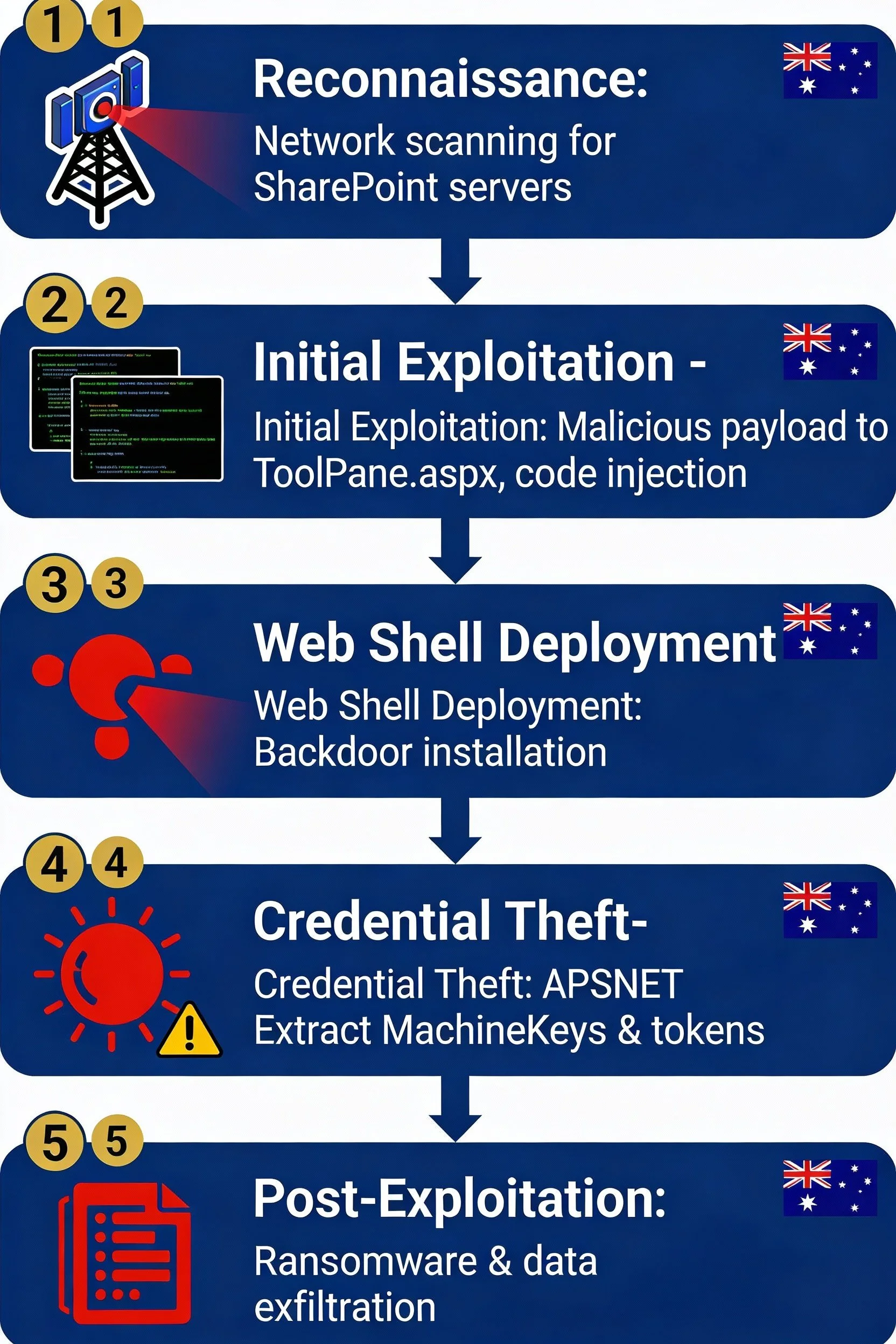
Phase 1: Reconnaissance and Targeting
Attackers conduct wide-scale internet scanning to identify exposed SharePoint endpoints. Target lists are curated to include government, financial services, healthcare, education, and critical infrastructure entities across Australia and the broader region.
Phase 2: Initial Exploitation
The attacker sends a crafted POST request to ToolPane.aspx containing a malicious serialised payload generated with off-the-shelf tooling. This exploits the deserialisation flaw, allowing code execution within the SharePoint worker process—no credentials required.
Phase 3: Web Shell Deployment
Upon successful exploitation, the attacker deploys a web shell (often named similarly to spinstall0.aspx) into the SharePoint layouts directory. This provides persistent, remote command execution over HTTPS, blending into normal traffic.
Phase 4: Credential and Key Theft
From the compromised server, the web shell is used to extract:
- ASP.NET MachineKeys used to sign authentication cookies
- Service account credentials and cached tokens
- Configuration secrets and connection strings
With MachineKeys, attackers can forge valid authentication cookies and maintain access even after passwords are changed.
Phase 5: Post-Exploitation and Ransomware
Finally, actors deploy ransomware, exfiltrate data for double extortion, and pivot into Microsoft 365, Teams, and OneDrive environments where trust relationships are weakly segmented.
Detection Challenges for Internal Security Teams
Many Australian organisations lack the depth of logging, telemetry, and expertise needed to spot ToolShell exploitation in time. This is where targeted external penetration testing and internal penetration testing become critical validation tools.
Evasion Techniques
Attackers deliberately design payloads to evade:
- Signature-based antivirus solutions
- Generic intrusion detection systems
- Baseline log analysis without SharePoint-specific rules
Limited Visibility in Application Layer
Malicious activity executes inside legitimate SharePoint worker processes (w3wp.exe), making it appear as standard application behaviour. Without an application security assessment capability, subtle indicators such as odd PowerShell child processes or unusual file writes are easily missed.
Patch Bypass Capabilities
Perhaps most concerning, ToolShell can bypass earlier security updates when configuration and key rotation steps are mishandled. Organisations that rely solely on patch status reports may believe they are protected while remaining critically exposed.
Why Traditional Security Measures Are Insufficient
The ToolShell crisis exposes fundamental gaps in many organisations’ defensive assumptions.
Vulnerability Scanning vs. Penetration Testing
Standard vulnerability scanners report missing patches but cannot reliably validate exploitability, detect patch bypasses, or assess the end-to-end kill chain. This is the core limitation in the vulnerability assessment vs pen test debate.
Key takeaway: A “green” vulnerability scan report does not mean your SharePoint environment is safe from ToolShell-style attacks.
Limitations of Patch Management Alone
Microsoft’s emergency updates require careful, multi-step implementation:
- Timely installation across all SharePoint instances
- Rotation of cryptographic keys and secrets
- Validation that exploitation attempts are effectively blocked
- Coordination with change management and outage windows
Perimeter Defence Failure
Firewalls, web application firewalls, and IPS often cannot block this attack because it:
- Uses legitimate HTTPS traffic over standard ports
- Targets normal SharePoint endpoints and paths
- Involves encrypted and obfuscated payloads
Key takeaway: Perimeter controls alone are insufficient. Validation via realistic attack simulation is required.
The Critical Role of Penetration Testing
This threat landscape makes it abundantly clear why penetration testing is important. Only adversarial simulation can confirm whether your SharePoint deployment withstands real-world attack techniques.
External Penetration Testing
External penetration testing focused on SharePoint should:
- Identify all internet-exposed SharePoint instances and versions
- Attempt ToolShell exploitation chains in a controlled, safe manner
- Validate patch effectiveness and identify bypass conditions
- Assess how far an attacker can move from SharePoint into the broader network
Internal Penetration Testing
Internal penetration testing then assesses post-exploitation risk, including:
- Privilege escalation paths from SharePoint service accounts
- Detection of credential theft and lateral movement
- Ransomware deployment scenarios
- Effectiveness of monitoring and incident response processes
Red Team Assessment Services
Red team assessment services provide full kill-chain validation by:
- Emulating ToolShell tactics, techniques, and procedures (TTPs)
- Testing SOC detection, triage, and escalation
- Validating containment and eradication procedures
- Delivering board-ready reporting that translates technical findings into business risk
Immediate Actions for Australian Businesses
Organisations should treat this as a 24–48 hour response window. The following checklist can support rapid mitigation.
Emergency Mitigation Checklist
| Action | Priority | Timeline |
|---|---|---|
| Identify all on-premises SharePoint servers | Critical | Within 4 hours |
| Disconnect internet-facing SharePoint servers (where feasible) | Critical | Immediately |
| Apply latest SharePoint security updates | Critical | Within 24 hours |
| Rotate ASP.NET MachineKeys and relevant credentials | High | Within 48 hours |
Hunt for spinstall*.aspx or other suspicious web shells |
Critical | Within 4 hours |
| Review SharePoint IIS logs for exploitation indicators | High | Within 24 hours |
Compromise Assessment
If exploitation is suspected, organisations should:
- Engage incident response specialists immediately
- Preserve forensic images of affected systems
- Analyse web, security, and endpoint logs for anomalous activity
- Assess potential data exfiltration and regulatory notification obligations
Long-Term Security Strategy
Beyond immediate containment, organisations should evolve their security posture to reduce exposure to similar vulnerabilities.
Adopt a Proactive Security Model
- Schedule quarterly external penetration testing of all internet-facing assets
- Conduct annual internal penetration testing focused on identity and lateral movement
- Run biannual red team exercises emulating nation-state-level TTPs
- Maintain continuous vulnerability assessment with exploitability validation
Implement ACSC Essential Eight
Aligning with the ACSC Essential Eight maturity model strengthens resilience against similar attacks by improving patching, access control, application hardening, and backup practices.
Cloud Migration Considerations
Because ToolShell affects on-premises SharePoint only, organisations should reassess platform strategy:
- Evaluate feasibility of migrating workloads to SharePoint Online
- Review data sovereignty and compliance requirements in the Australian context
- Budget for cloud penetration testing and post-migration security assessments
Conclusion: Act Now or Pay Later
The ToolShell vulnerability represents a clear and present danger to Australian organisations running on-premises SharePoint. With sophisticated actors actively compromising systems and deploying ransomware, the question is not whether you are on a target list, but whether your defences will hold.
Penetration testing services Australia wide must now treat SharePoint exploitation testing as a standard component of every engagement. The cost of a focused application security assessment is minor compared to the financial, legal, and reputational impact of a significant data breach.
Key takeaway for boards and CISOs: Do not rely on patch status alone. Only realistic, threat-informed testing of your SharePoint environment will provide assurance that ToolShell-style attacks are effectively mitigated.
Secure Your SharePoint Environment Today
Our Australian penetration testing team specialises in adversarial simulation of emerging threats like ToolShell. We provide:
- Emergency SharePoint compromise assessments
- ToolShell exploitation testing and patch validation
- Comprehensive red team exercises emulating nation-state techniques
- Board-level reporting that clearly articulates business risk and remediation priorities
- 24/7 incident response support for active and suspected intrusions
Call to action: Contact our security specialists today to schedule an urgent assessment of your SharePoint environment. Validate your defences before an attacker validates them for you.